 SoundBar · Launch
SoundBar is out: a volume for every app on your Mac
macOS has one volume for every app. SoundBar, our fourth Mac app, gives each app its own slider, equalizer and output, in the notch or the menu bar.
 Atta · 6 min read
In short
SoundBar is a per-app volume mixer for Mac. Every app that plays sound gets its own volume slider (up to 200%), mute button, 10-band equalizer, balance and output device, in the MacBook's notch or the menu bar. It needs macOS 15 or later, on Apple silicon or Intel. It is a one-time purchase with a 3-day free trial.
SoundBar is out. It is our fourth Mac app, after Flit, Vitals and Levers, and it adds something macOS has never had: a volume for each app.
Why the Mac needs a volume mixer
The Mac has one volume slider, and every app shares it: the call, the song, the video in a browser tab and the pings from Slack. Turn the music down before a call and the call goes down with it. A video recorded too quietly means turning the whole Mac up, and then everything else is too loud.
SoundBar gives every app that plays sound a slider of its own, from silent to 200%, and a mute button. Turn the video up, keep the call where it is, and leave the music alone.
The mixer, in the notch or the menu bar
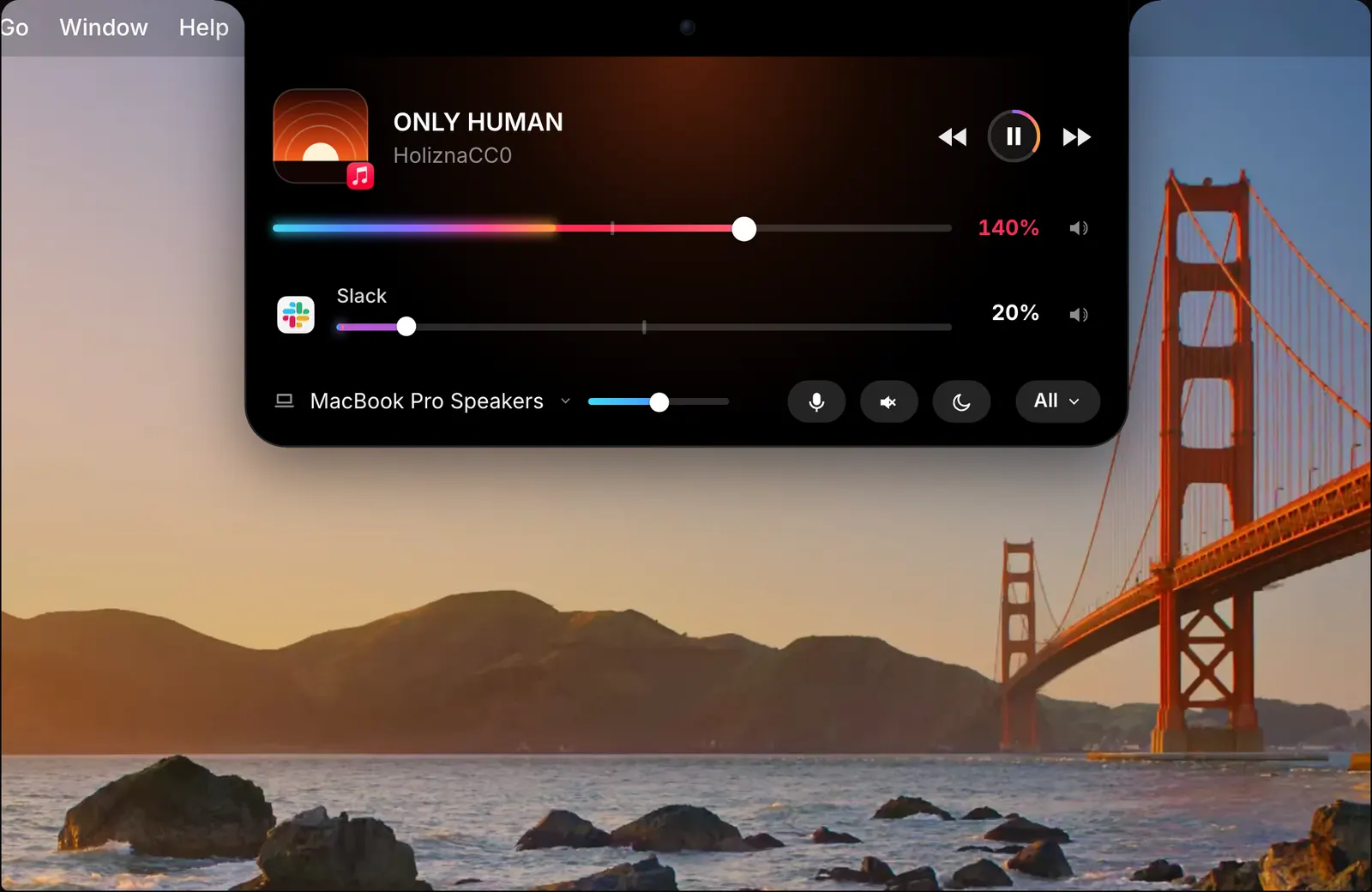
On a MacBook with a notch, SoundBar opens from the notch. Point at it or click it, whichever you choose, and you see the song that is playing, with its cover and buttons for previous, play and next. Under it is every app making sound right now, each with its own slider.
Click All for the full mixer: every app, the Mac’s output and the microphone, each with a slider, and an equalizer for each app.
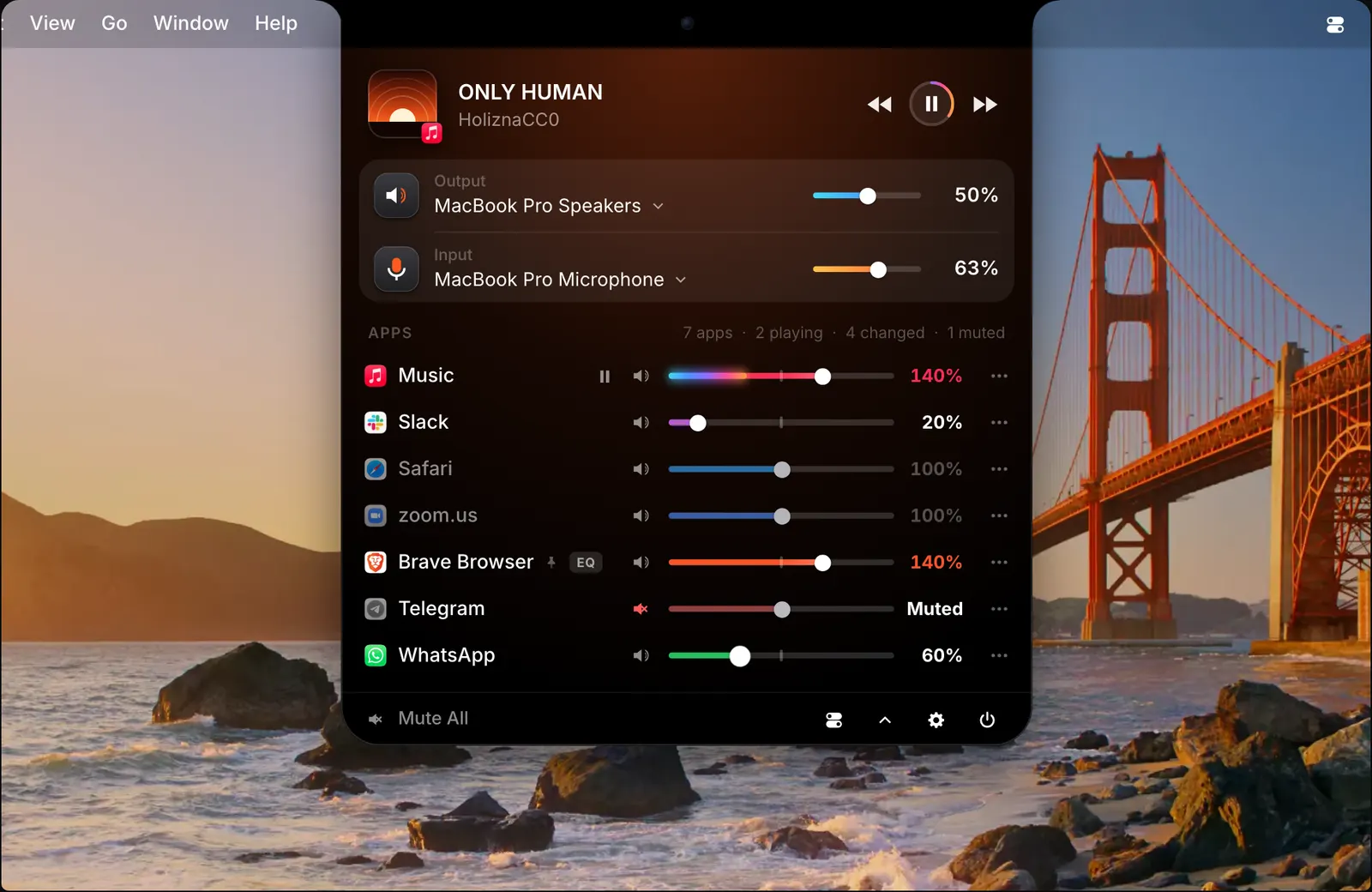
A live level inside each slider shows how loud that app is, so you can see which one is making the noise before you reach for it. Past 100%, the slider gets brighter the further it goes. Each app keeps its volume the next time it opens.
On a Mac without a notch, or on an external display, the same mixer opens from the menu bar. On a MacBook you pick one, or have both.
A dial in the corner of the screen
Push the pointer into a corner of the screen and a volume dial comes out. The rim is the Mac’s volume. Each ring inside it is an app that is playing, up to three, with its icon at its level. Scroll or drag to turn it, and click to mute.
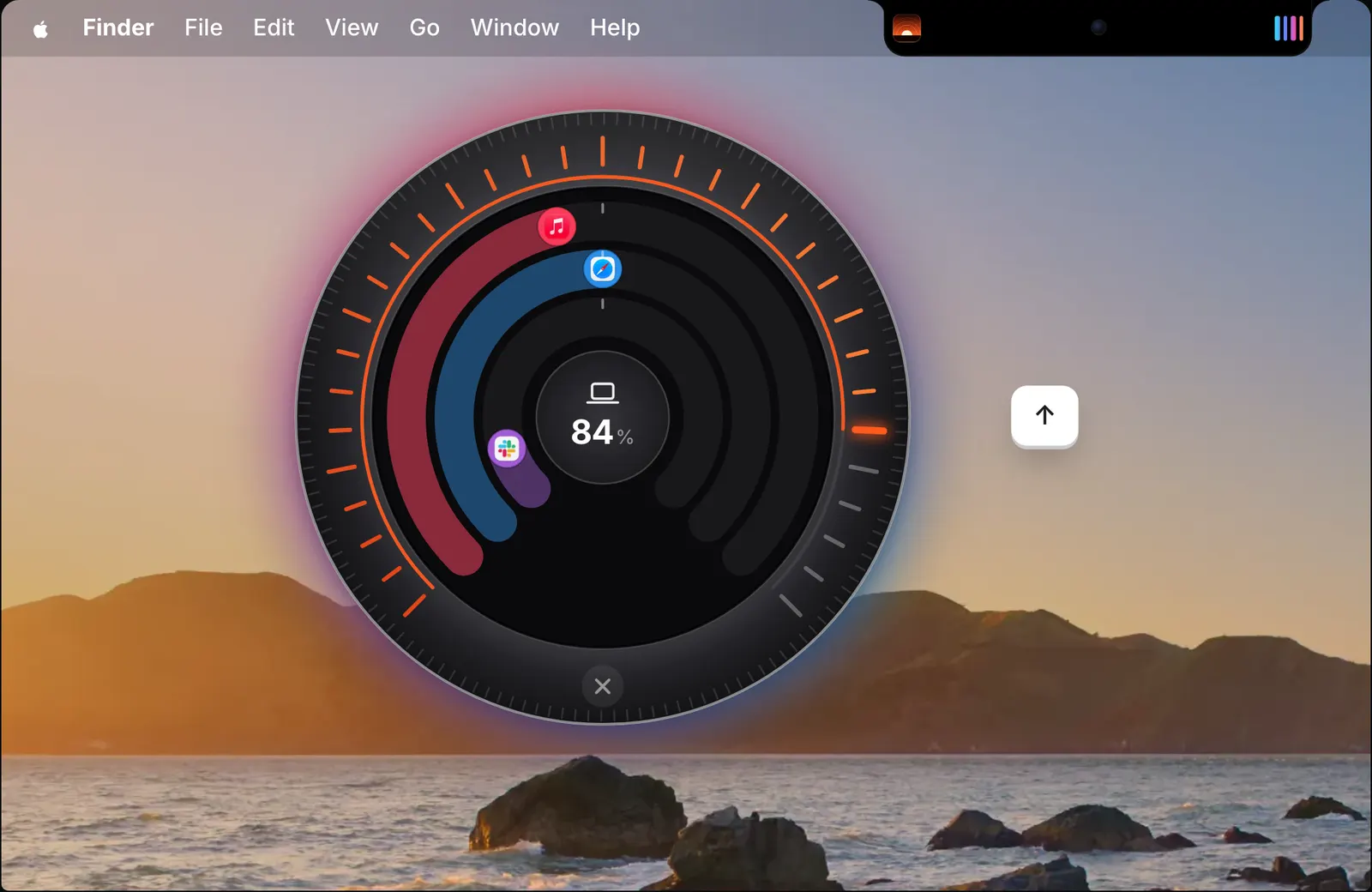
Pull the dial out by its hub and the whole knob stays on screen until you close it. It works with any mouse, needs no extra permission, and stays away from a corner macOS already uses as a hot corner.
On a MacBook, the edges of the trackpad change the volume too. Slide a finger up or down the right edge for the Mac’s volume, or the left edge for the app in front. The pointer stays where it was.
An equalizer and an output for each app
Each app has a 10-band equalizer with 11 presets, such as Bass Boost, Vocal, Podcast and Late Night, and a left-right balance. Mono, or left and right swapped, are there too. Every setting belongs to that app alone.
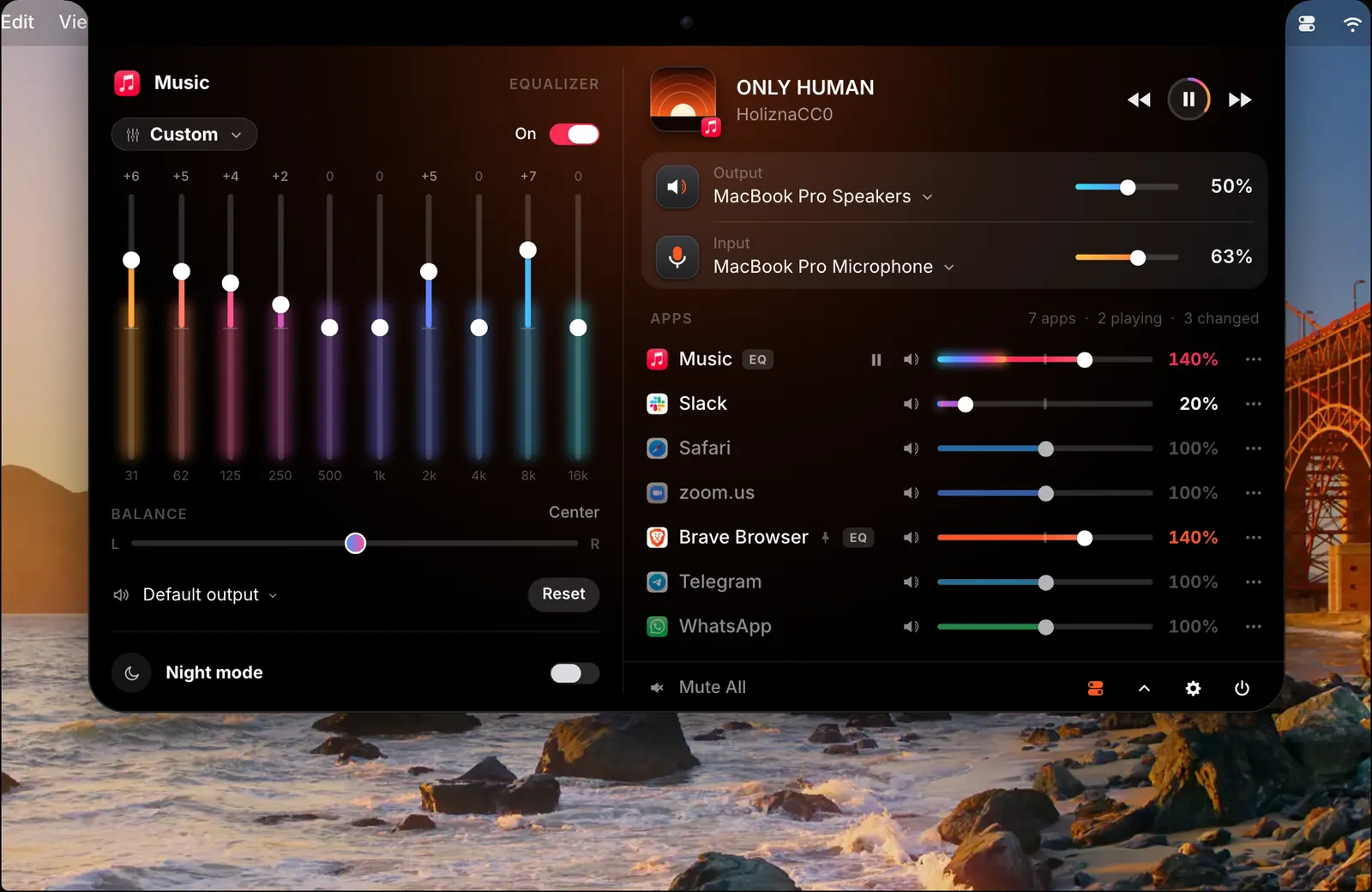
Each app can also play through an output of its own: music through the speakers and a call through your AirPods, at the same time. For headphones, import an AutoEQ curve and it corrects all sound from the Mac.
Sound follows your headphones
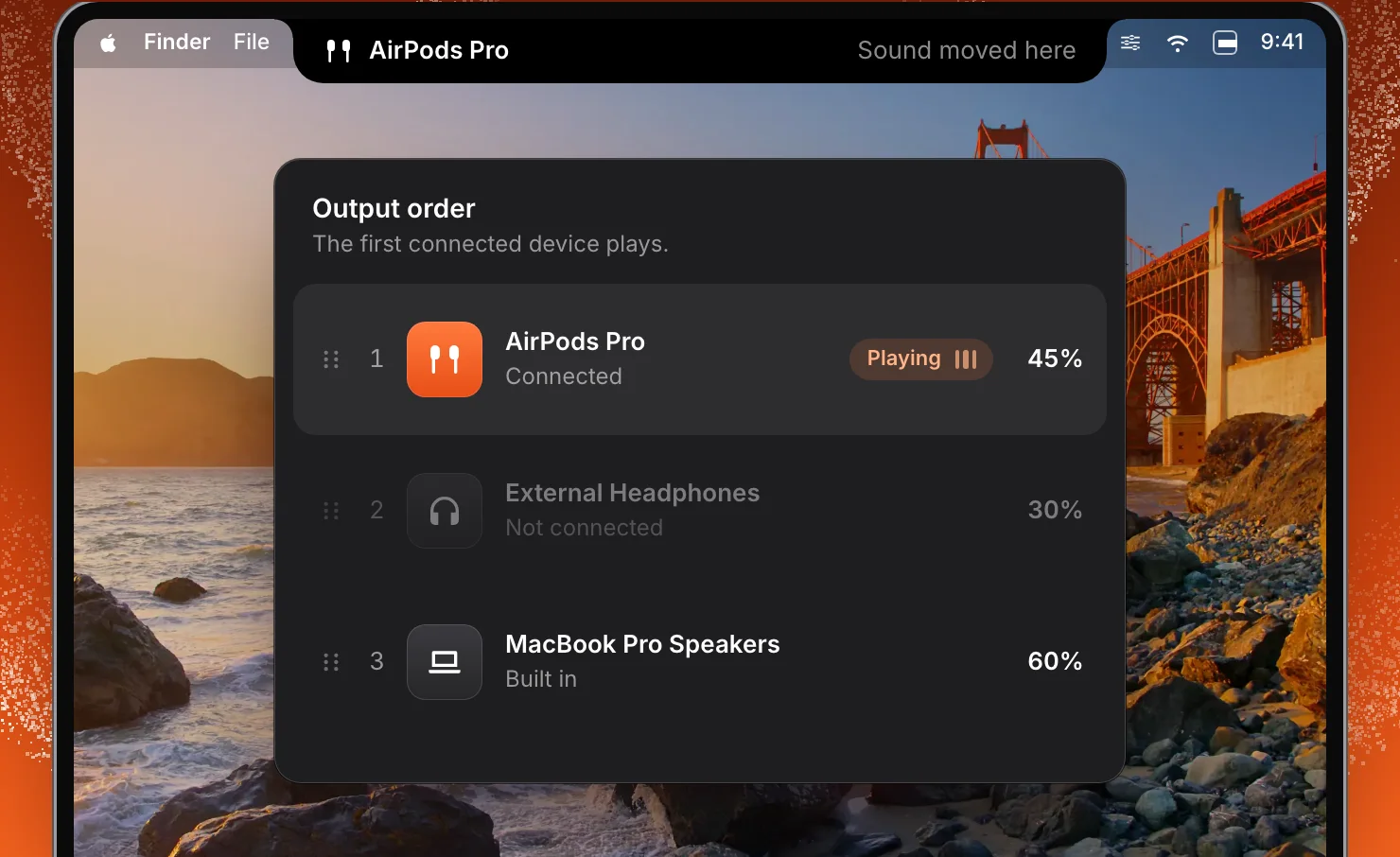
Put your outputs and microphones in the order you prefer. When one connects, SoundBar switches to the first one in your order, at the volume it had last time, so headphones never start at speaker volume. The notch tells you when sound moves. Several speakers can be grouped into one output with a single volume.
Quieter apps during a call
When an app starts using the microphone, the other apps fade down, to 30% by default, and come back when the call ends. ⌃⌥I mutes the microphone from any app, and the notch shows that it is muted. SoundBar sees which app has the microphone, but never reads its audio.
Night mode evens out the loud and quiet parts of every app, so you are not changing the volume all the way through a film. Loudness match brings every app to the same loudness.
Type what you want to hear
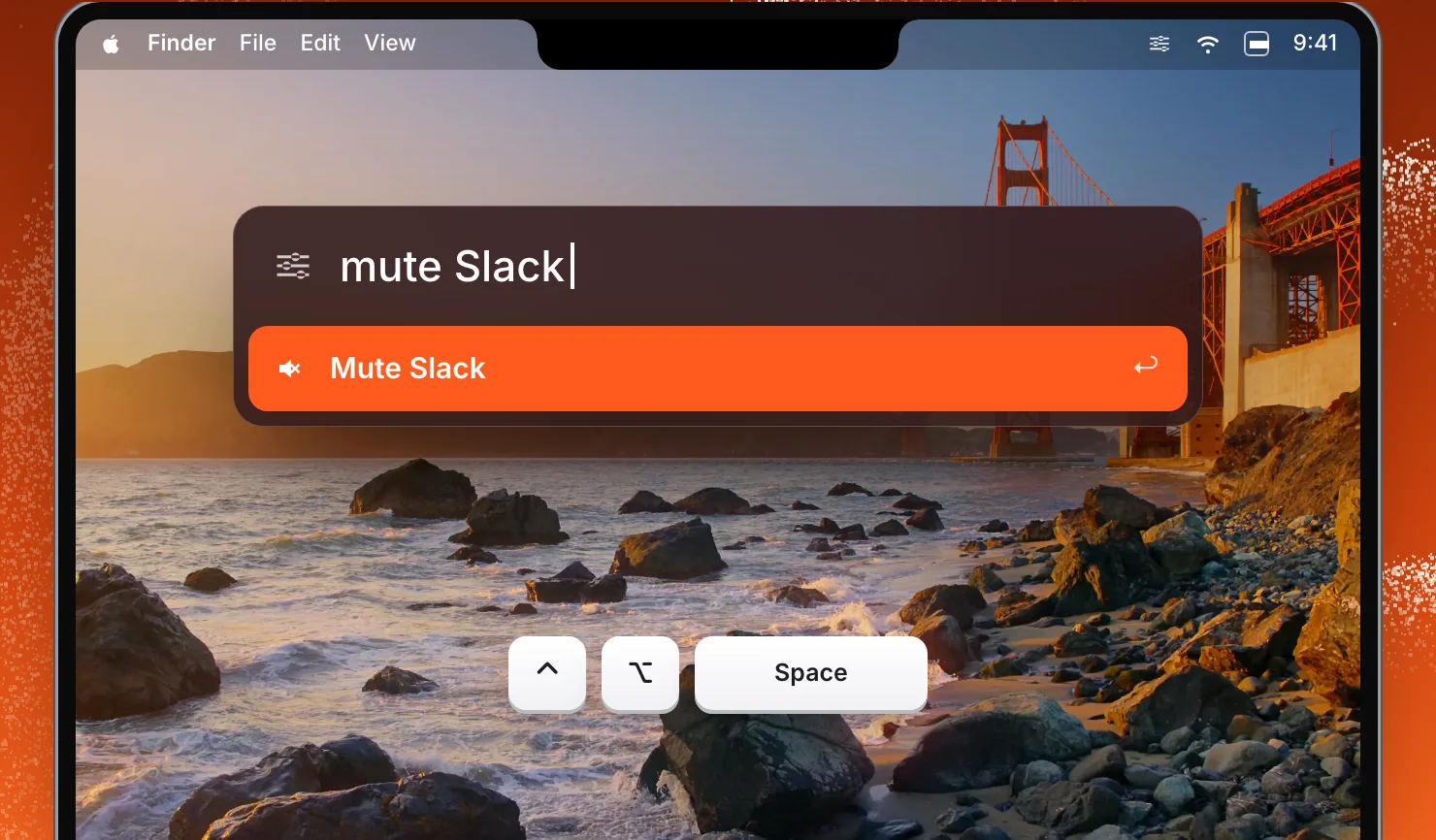
Press ⌃⌥Space in any app and type a command: “mute Slack”, “Spotify 40” or “Music through AirPods”. Press Return and the notch confirms it.
There are also global shortcuts, nine actions for the Shortcuts app, MIDI control for a knob or a fader, soundbar:// links for scripts, and profiles. A profile saves every volume and setting, and applies them with a click, when a device connects, while an app is open, or at a set time.
What stays on your Mac
To change an app’s volume, SoundBar passes that app’s sound through itself, on your Mac, as it plays, and keeps none of it. Nothing is recorded, stored or sent anywhere. There is no account and no analytics.
macOS asks once for permission to capture audio, which is how SoundBar receives an app’s sound to play it at the level you set. SoundBar goes online only to check for updates and your licence. The privacy page on soundbarmac.com lists every permission.
Which Macs it runs on
SoundBar needs macOS 15 Sequoia or later, on Apple silicon or Intel. It comes in 16 languages and is notarized by Apple. With Homebrew, brew install --cask foredotstudio/tap/soundbar installs the same app.
What it costs
SoundBar is a one-time purchase: $29 for one Mac, with every update for life and no subscription. Until 5 December, in our Black Friday sale, it is $6.99. It is sold for 1, 2 or 5 Macs, on one key.
There is a 3-day free trial with no account and no card, and a 14-day refund. Students and teachers get 25% off. SoundBar is also in Fore Plus, with Flit, Vitals and Levers on one key for $69.
The first days
SoundBar 1.0 came out on 19 November. Four updates followed in two days:
- Room for other notch apps. If DynamicLake, NotchNook, Alcove or boring.notch is running when you set SoundBar up, it opens from the menu bar instead, so the two never draw over each other.
- A steadier hold on each app, including apps that restart their audio, as Chrome does.
- A clearer notch. The song and the app playing it each have a row of their own, so every slider lines up.
Every change is in the changelog.
Try it
Download SoundBar, open it, and choose Try Free. The setup asks macOS for audio access, then plays a song so you can turn it down, mute it or push it past 100% with the real mixer.
If an app’s slider ever stops working, click Copy Diagnostics in Settings › Setup & Help before you restart SoundBar, and email it to us.
Questions
Does macOS have a per-app volume mixer?
No. macOS has one volume for all apps. SoundBar adds a volume slider, mute, equalizer and output device for each app.
Can I boost an app above 100%?
Yes. Each app goes up to 200%. Past 100%, the slider's colour gets brighter the further it goes.
Can each app use a different output device?
Yes. Each app can play through its own output, for example music through the speakers and a call through your AirPods.
Do I need a MacBook with a notch?
No. On a Mac without a notch, SoundBar runs in the menu bar and the same mixer opens from there. On a MacBook with a notch you choose the notch or the menu bar, or have both.
Does it work with DynamicLake or another notch app?
Yes. If DynamicLake, Droppy, NotchNook, Alcove or boring.notch is running when you set SoundBar up, it opens from the menu bar instead, so the two never draw over each other.
Does SoundBar record my audio?
No. It passes each app's sound through at the level you set, on your Mac, and keeps none of it. Nothing is recorded or sent anywhere.
Is it a subscription?
No. You pay once, and every future update is included.
Is it on the Mac App Store?
No. SoundBar is a direct download from soundbarmac.com, notarized by Apple. It is also on Homebrew.