


1 Mac 62% off
$15 Regular price $39
One-time
- 1 Mac
- All features
- A year of updates
- Yours for good after it
- For your own Mac.
Buy for 1 Mac
15 left at this price
Hold a key, talk, and finished text lands in any app about 0.7 seconds after you let go. It all runs on your Mac, and you pay once.
$15 Regular price $39, paid once
7-day free trial · 14-day refund · macOS 14 or later · Apple silicon
Loved by 2,000+ Mac users
What is Flit
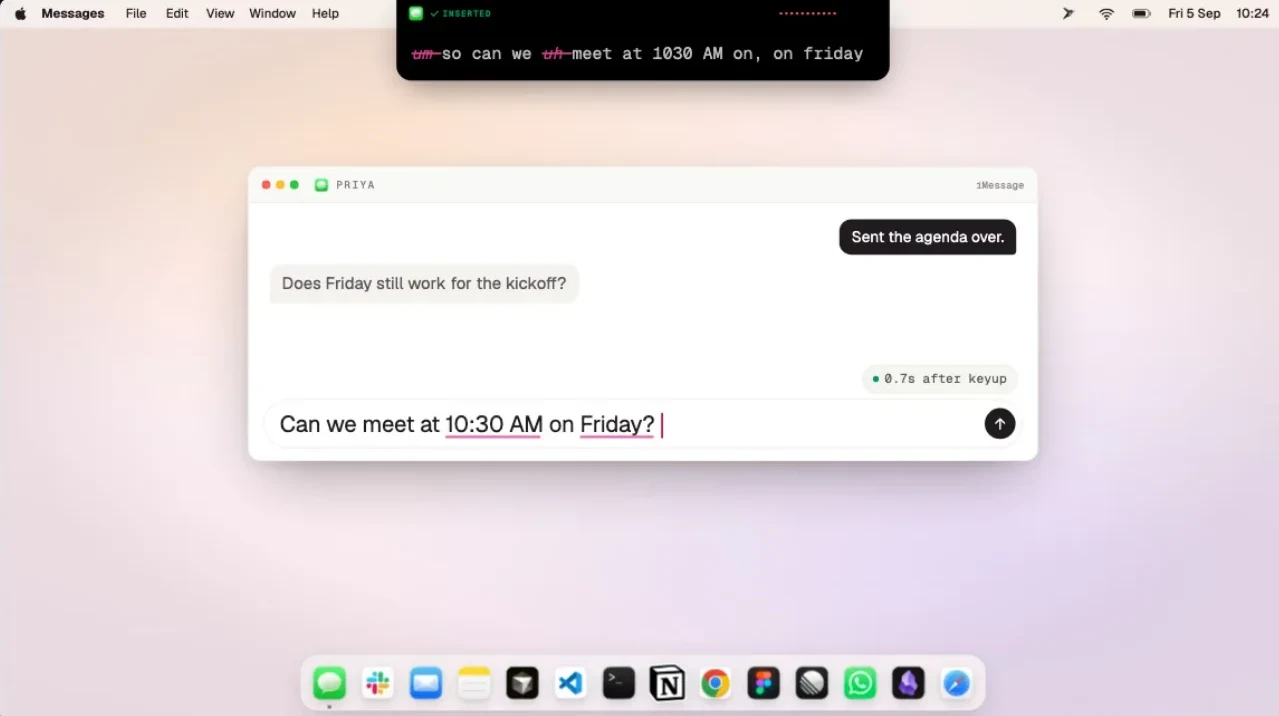
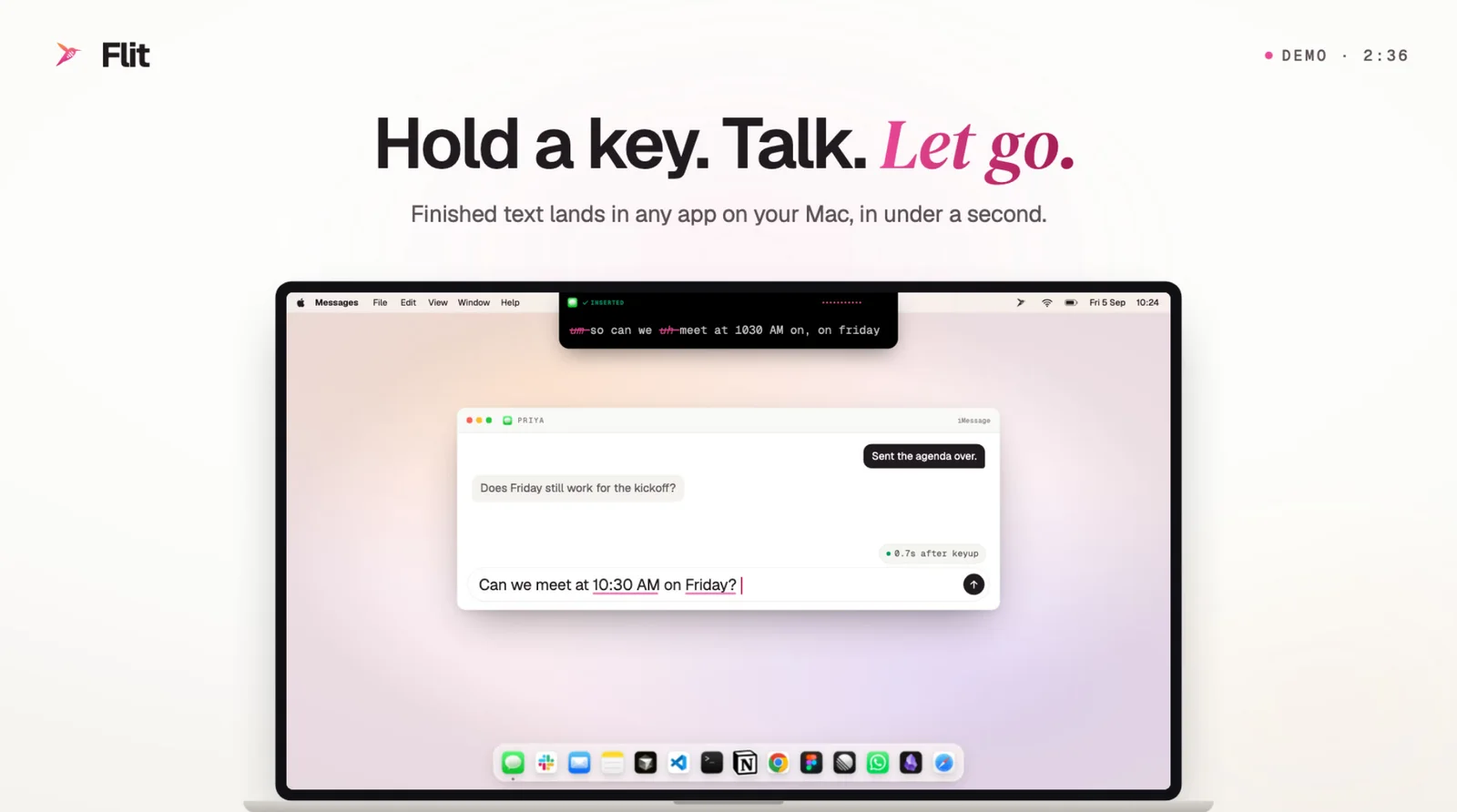
Flit is dictation for your Mac that writes finished text, not a transcript. Hold a key, say what you mean, and let go. The fillers and doubled words are gone, times and email addresses are written properly, and the sentence is at your cursor in whatever app you are using.
It is for people who write all day and think faster than they type: replies, notes, drafts, and prompts for Claude Code, Codex or Cursor. Speaking is about four times faster than typing, and Flit gives you that speed without a cleanup pass afterwards.
Everything happens on the Mac: the voice model, the formatting and your dictionary. There is no account and no server, it works with Wi-Fi off, and there is no subscription.


Hold to talk
Hold Fn, a right-hand key such as Right Command, or a shortcut of your own, and talk. When you let go, the finished text is at your cursor in about 0.7 seconds, or about 0.15 seconds in a terminal. Pausing while the key is down ends nothing.

Finished text
Other dictation hands you a transcript. Flit does the cleanup on your Mac before the text lands: fillers go, times and email addresses are written properly, and “scratch that” keeps only what you meant. Anything with one right answer is done by a fixed rule, not a model.

Tone and context
Flit knows where your cursor is and writes for it: relaxed in Messages, professional in Mail, your exact words in a terminal. Pin a tone to any app and your rule wins. Turn on context and a reply spells names the way the thread does.

Coding agents
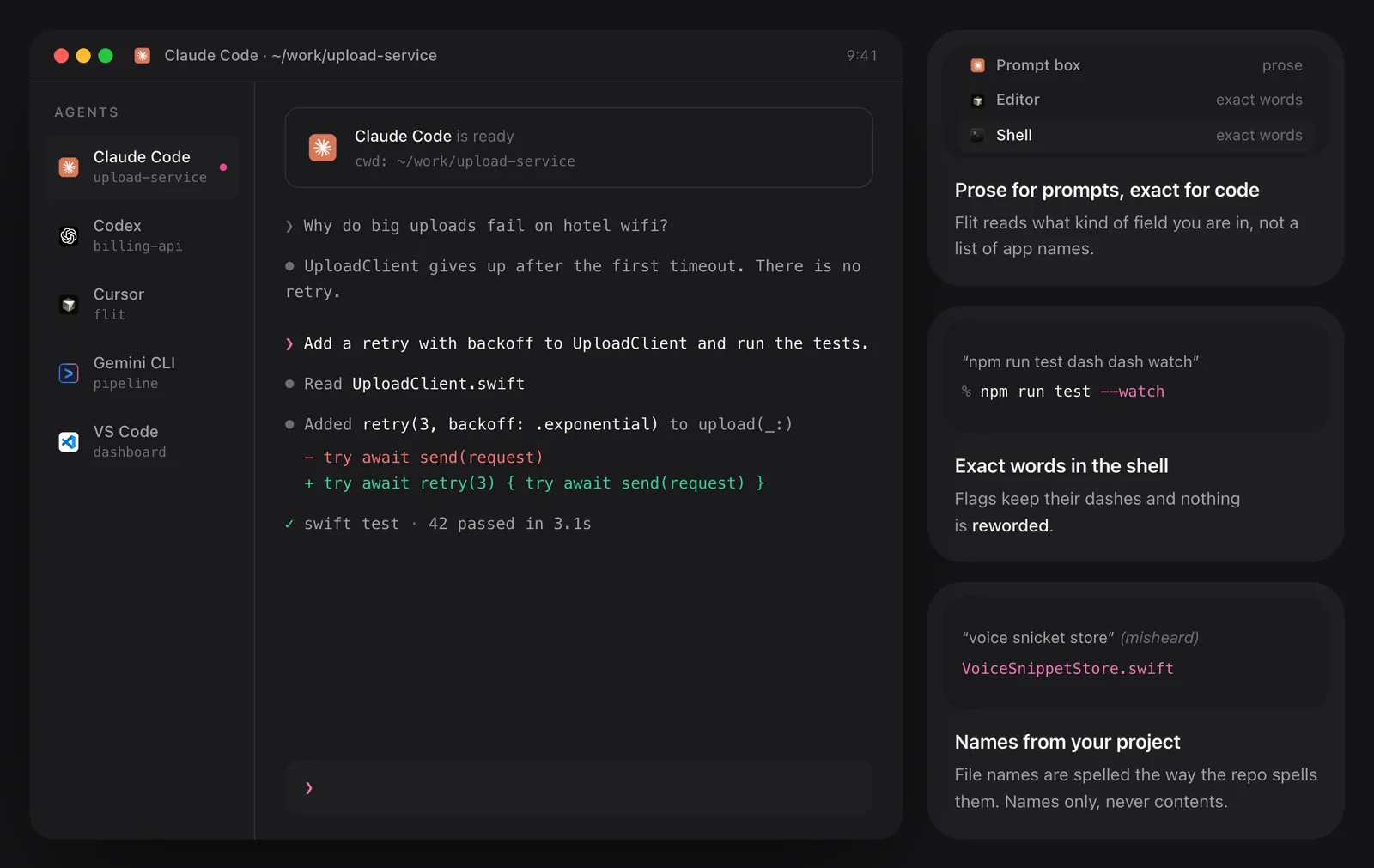
Say what you want built and the brief lands in the prompt box as a clean paragraph, ready to send. In a shell or an editor Flit types your exact words, flags included. It reads the file names in your open project, so they come out the way your repo spells them.
Your words
Names, products and jargon trip up every speech engine. Paste yours in once, or correct the same word twice and Flit asks whether to keep it. From then on the misheard versions are repaired by rule, in every app.

Transcribe files
Drop an audio or video file on the Transcribe tab or the menu bar icon, or right-click it in Finder. The text appears as it goes, and a two-hour recording takes a few minutes. Export plain text, Markdown, SRT or VTT, with nothing uploaded.

Features
Each feature has a page of its own.
Privacy
Flit records, transcribes and formats on the Mac itself. No server receives your audio or your text, so dictation keeps working with Wi-Fi off, and a network monitor shows nothing going out while you speak.
Pricing
One payment and no subscription. 7 days free first, no card.
$15 Regular price $39
One-time
15 left at this price
$29 Regular price $78
One-time · $14.50 a Mac
$65 Regular price $195
One-time · $13 a Mac
$39 Regular price $99
One-time
20 left at this price
$69 Regular price $198
One-time · $34.50 a Mac
$149 Regular price $495
One-time · $29.80 a Mac
Prices in US dollars; any sales tax or VAT is shown at checkout. macOS 14 or later · Apple silicon.
Not sure yet? Download Flit and try it free for 7 days.
Your licence key arrives by email the moment you pay. 14-day refund if it is not for you.
Checkout by Paddle, our merchant of record. Atta Ur Rehman Shah trades as Fore Studio.
The bundles
One key for all of them, one Mac for each app, every update included.
Flit, Vitals, Levers and SoundBar, yours for life.
$69 Regular price $206 once
You save $137
The apps out today, and every app we make after them.
$99 Regular price $299 once
You save $200, and every new app is yours
Secure checkout by Paddle · Your key by email in seconds · 14-day refund · What is in each
Questions
Something else? Email [email protected]. A person answers, usually the same day.
Yes. The trial lasts 7 days with every feature on, and it needs no card and no account.
A Mac with Apple silicon and macOS 14 or later. A few voice models need macOS 26.
The app is 37 MB. You then choose one voice model, a separate download of up to 2.8 GB. Apple’s own speech recognition needs no download at all.
No. Flit never asks who you are.
Yes, wherever you can type, including Chrome and Electron apps like Slack and VS Code.
More than 1,600, all on your Mac, and 30 of them appear while you speak. Spoken commands and the rules for times and numbers work in English today.
Yes, completely. Once your voice model is downloaded, Flit needs no connection to dictate or transcribe.
Not yet. Flit transcribes a recording you already have, without speaker labels. Meeting recording and speaker labels are planned, and will run on your Mac too.
Flit is for macOS on Apple silicon today. Windows is in the works, with no date yet.
Your key arrives by email as soon as you pay. Open Flit’s Settings → License, paste the key and press Activate, once on each Mac it covers.
One. For more, both kinds come in packs on one key, for up to 25 Macs. Moving to a new Mac costs nothing.
Flit for Mac includes 12 months of updates, and an optional renewal adds another year. Skip it and the app keeps working with everything it has. Lifetime includes every future version, with no renewal.
Yes, within 14 days of your first purchase, no questions asked. Nothing renews automatically.
Yes. Fore Plus puts Flit, Vitals, Levers and SoundBar on one key, and Fore Insider adds every app we release later.
No. Your audio and your text stay on your Mac, and you can check that by dictating with Wi-Fi off.
For three things only: a model download you start, the licence check, and the update check if you allow it. None of them carries anything you dictate.
Only if you turn context on. It then reads text from the field you are typing into, keeps it in memory for one dictation, and never reads password fields.
No. Your audio never leaves your Mac, so there is nothing to train on.
Yes. Both put finished text at your cursor in any app, but Flit transcribes on your Mac instead of a server, needs no account, and is paid once. Wispr Flow is the better fit if you also dictate on Windows or a phone, or need SSO and admin controls.
For the odd message, Apple’s free Dictation is enough. It gives you roughly what you said. Flit removes fillers, formats times and emails by rule, matches each app’s tone, and adds snippets, a learning dictionary and a codebase index. They use different shortcuts, so you can keep both.
Both can run on your Mac. Flit writes while you are still speaking, where Superwhisper shows text after you stop, and Flit is paid once, not by subscription. Superwhisper also records meetings and runs on Windows, iPhone and Android.
In part. Both transcribe recordings on your Mac with subtitle export, but MacWhisper labels speakers, which Flit does not do yet. Flit also types what you say into any app as you speak.
Compared
| Flit | Wispr Flow | Apple Dictation | |
|---|---|---|---|
| Where your voice is transcribed | On your Mac, always | In the cloud | On your Mac, for supported languages |
| Works with no internet | Fully | No | When it runs on your Mac |
| How you pay | Once | Subscription, per user | Free with macOS |
| Platforms | Mac, with Windows in the works | Mac, Windows, iPhone, Android | Mac, iPhone, iPad |
| Knows your codebase | Indexes it on your Mac | No | No |
| Snippets | Yes, as plain files on your Mac | Yes, synced through an account | No |
Guides
 Vitals The Activity Monitor alternative for Mac. Utilities · macOS 15 or later $12.99
 Levers A clean Mac screen, in one click. Utilities · macOS 15 or later $6.99
 SoundBar A volume for every app, in the notch. Utilities · macOS 15 or later $6.99
 Rimlight A screen-recording studio for macOS. macOS Coming soon
Free for 7 days, and a full refund for 14 days after you buy.
Also at flit.fyi