


1 Mac 73% off
$12.99 Regular price $49
One-time
- 1 Mac
- All features
- Every update, for life
- For your own Mac.

Vitals counts every helper under the app that started it, keeps up to a year of history, and puts each reading in your menu bar.
Black Friday $12.99 Regular price $49, paid once, until 5 December $12.99 Regular price $49, paid once
3-day free trial · 14-day refund · macOS 15 or later
Loved by 2,000+ Mac users
★4.8 from 25 reviews
What is Vitals
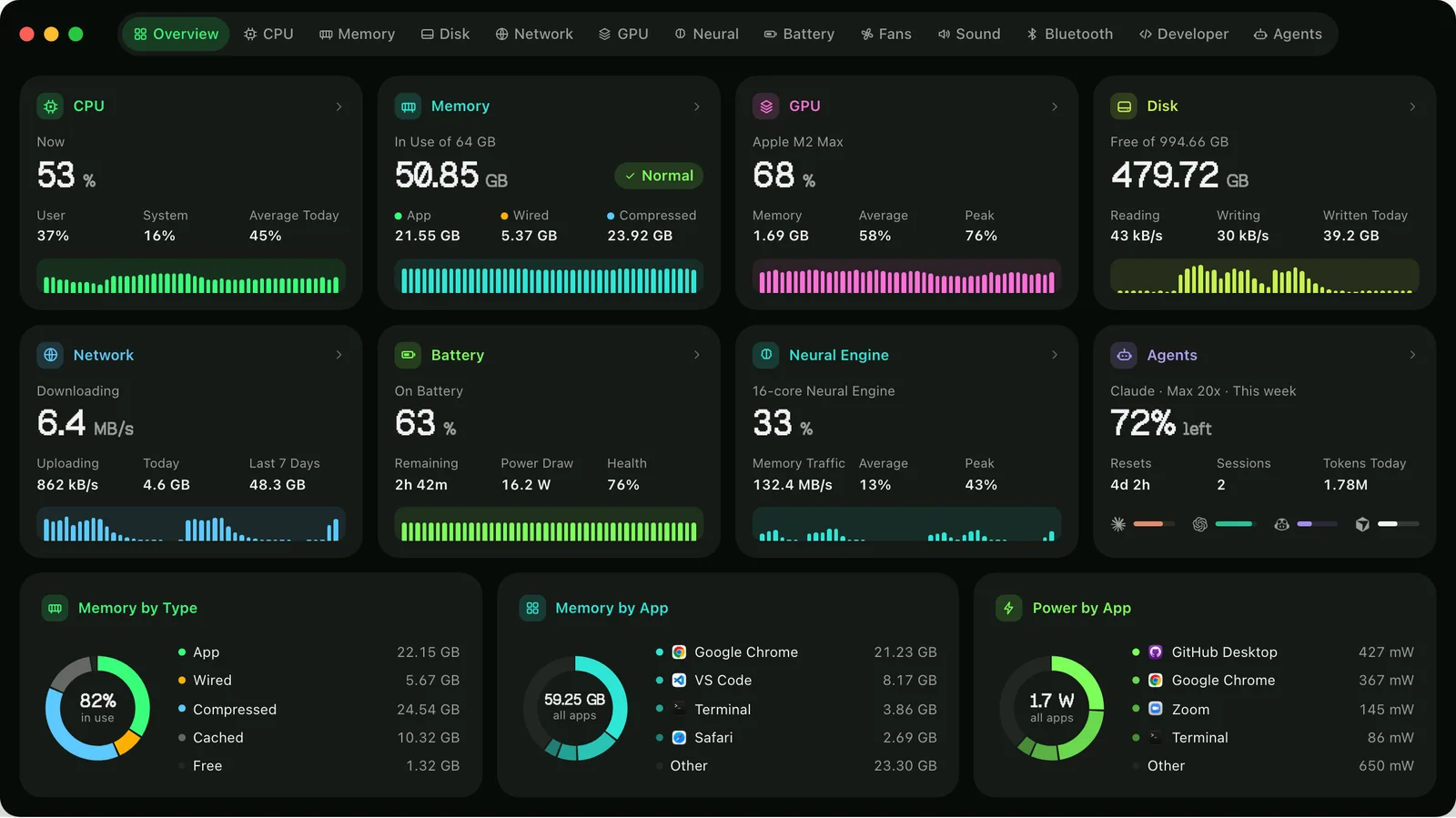
Vitals shows what your Mac is doing, app by app. CPU, GPU, Neural Engine, memory, temperatures, fans, disk, network and battery each have a tab, and every figure names the app behind it.
It is for anyone who has opened Activity Monitor, met a thousand processes, many of them called Helper, and closed it again. Developers get more: dev servers, open ports, Docker containers and coding agents, in one place.
It also remembers. Vitals keeps up to a year of history, tells you when an app misbehaves, and lets Claude, Codex or Cursor ask what is running. Nothing quits without your yes.


Apps, not processes
Every helper process is counted under the app that started it, so each app has one figure for memory, CPU, energy, disk and network. Click an app to see its processes, and click a process for its signature, its parent and its full command line.

Menu bar
Put CPU, memory, GPU, Neural Engine, network, disk, temperature, fan speed, battery or your AI plans in the menu bar, as a number, a graph or both, and ⌘-drag them into order. A reading turns red while it is under strain. Click one for a dropdown with every reading and the apps behind it.

History
Activity Monitor only knows about right now. Vitals keeps CPU, memory, energy, disk and network for the Mac and for every app, from the last hour back to the last year. A Peaks card shows the worst moment in any range and how long the Mac spent at a limit.

Temperatures and fans
Vitals shows the CPU and GPU temperature, every other sensor and every fan, on Intel and Apple silicon. When the Mac runs hot, it names the apps behind the heat, with Quit beside each. Leave the fans to macOS, hold them at a speed, or drag a curve that follows the CPU, the GPU, the hottest sensor or the battery.

For developers
The Developer tab groups what is running by the project folder it runs in, so three processes called node become three named projects, each with its ports. A dev server idle for days is pointed out, with the memory and port that stopping it frees. Docker containers, Homebrew services and every listening port sit beside them.

Agents and AI
The Agents tab lists Claude Code, Codex, Gemini CLI and the rest by name, with the project each works in, whether it is waiting for you, and everything it started. Quit a session and its servers and browsers go with it. For Claude, Codex, Copilot, Cursor and more, Vitals shows what is left of each plan, when it resets and whether you are on pace.

Features
Each feature has a page of its own.
Privacy
Vitals has no account and no analytics. The apps you run, your history and your project names stay on the Mac, and your history is a file you can open or export yourself.
Reviews
★ 4.8 from 25 reviews written in the app.
★★★★★
…it doesn't feel overwhelming or bloated in the slightest. It feels native. Lightweight. It's an absolutely vital app.
 Merlin Verified owner
★★★★★
I’ve tried many monitoring tools in the past, and Vitals just shows me exactly the information i need to see.
 Tobias Strebitzer CTO · Verified owner
★★★★★
Makes up really well for everything the built-in Activity Monitor lacks on MacOS, and then some… Highly recommended and well worth the money for the peace of mind it gives me!
 Kai Verified owner
★★★★★
This is a great, well-designed app… It replaced many apps I’d been using with just this one.
 Stefano Software engineer · Verified owner
★★★★★
This is THE modern resource management tool. For agentic coding, the built in MCP is a game changer.
 James Verified owner
★★★★★
It’s a game changer on my mac - I probably wouldn’t be able to ever go back
 Federico Verified owner
★★★★★
Love it - bought it as one of the first 100 users and even then i was happy with the funnctionality, but now vitals really is superb…
★★★★★
Simple, easy to use… I highly recommand, the status bar widget is fully customisable and super clean.
 Fclmnt iOS developer · Verified owner
★★★★★
Amazing tool!
 Abdola Munir Verified owner
★★★★★
I recently bought Vitals and I'm enjoying it.
★★★★★
Great app if you like visuals
I’m a visual processor and the tools built in to the Mac and Windows OS’s just make things worse for me. Vitals shows me what I want to know quickly and in a visually organized way that I can understand. For better or worse it has shown me that I am clearly due for a laptop upgrade from my 2020 MacBook Air M1. 😂 the three programs I use most (VSCode, Chrome, and Claude) plus the OS itself, completely saturate the memory of the machine and now I know why adding one more task would grind my machine to a halt. It also showed me what things are resource intensive so I know what not to try and run at the same time. Fantastic and super helpful. Great UI and UX!
Now I find myself stealing quick glances at the menu bar, instead of taking another sip of coffee.
 Ed Wiseman On X
Pricing
$12.99 for one Mac until 5 December, 73% off the regular $49. One payment, every update after it, and no subscription. One payment, every update after it, and no subscription.
$12.99 Regular price $49
One-time
$19.99 Regular price $98
One-time · $9.99 a Mac
$39.99 Regular price $245
One-time · $8 a Mac
Prices in US dollars; any sales tax or VAT is shown at checkout. macOS 15 or later.
Not sure yet? Download Vitals and try it free for 3 days.
Your licence key arrives by email the moment you pay. 14-day refund if it is not for you.
Checkout by Paddle, our merchant of record. Atta Ur Rehman Shah trades as Fore Studio.
The bundles
One key for all of them, one Mac for each app, every update included.
Flit, Vitals, Levers and SoundBar, yours for life.
$69 Regular price $206 once
You save $137
The apps out today, and every app we make after them.
$99 Regular price $299 once
You save $200, and every new app is yours
Secure checkout by Paddle · Your key by email in seconds · 14-day refund · What is in each
Questions
Something else? Email [email protected]. A person answers, usually the same day.
Yes, 3 days with every feature, and no account or card. Download Vitals, open it and choose Try Free.
macOS 15 Sequoia or later, on Apple silicon and Intel. Power and temperature figures are most detailed on Apple silicon.
The App Store sandbox stops an app from reading other apps’ processes, which is the one thing an activity monitor has to do. Vitals is signed with an Apple Developer ID and notarized by Apple. You can also install it with Homebrew.
With no window open it takes a reading every five seconds and uses about a tenth of a percent of one core. It samples faster only while you are looking at it.
Every helper is counted under the app that started it, so a working Mac is about 60 rows instead of about 1,000. Click an app to see its processes, each with its own figures.
Yes. Hold them at a speed, run them along a curve that follows the CPU, the GPU, the hottest sensor or the battery, or run them at full speed for a while. Setting them uses Vitals’ small optional helper, and they go back to automatic when Vitals quits.
Agents: Claude Code, Codex, Gemini CLI, Aider, OpenCode, Cursor, GitHub Copilot, Amp, Kiro and Goose. Plans: Claude, Codex, GitHub Copilot, Cursor, Antigravity, Grok, Ollama and OpenCode, for every account signed in on the Mac, once you turn plan limits on in Settings → Integrations.
Yes. The vitals command gives the window’s answers as a table, JSON or CSV, and comes with the app or with Homebrew. Claude, Claude Code, Codex, Cursor and any assistant that speaks MCP can ask Vitals the same questions once you add it in Settings → Integrations.
Paste the key into Vitals once per Mac, during the trial or after it. There is no account. To move to a new Mac, choose Deactivate This Mac in Settings → License, or free the seat at apps.fore.studio/manage.
One licence covers one Mac. For more, buy a Lifetime pack of 2, 5, 10 or 25 Macs: one key that works on that many, and each Mac costs less as the pack grows. A year of updates for several Macs is a quantity at checkout.
Lifetime includes every update for life. A year of updates includes every version released in the next twelve months, and the app keeps working after that. Only a newer version needs a renewal. Both are paid once, with no subscription.
Yes, within 14 days of buying.
Yes, in Fore Plus: Vitals, Flit, Levers and SoundBar on one FORE- key that works in each app. Fore Insider adds Rimlight when it launches, and every app released after it.
Nothing about what you run. It goes online for updates, to activate the licence and check it once a week, to ask whether you have already sent a review, and, if you turn it on, to ask your AI plans’ makers how much is used. Activating sends the key, the Mac’s name and an anonymous ID.
macOS only lets an app read your own processes. The helper lets Vitals include the system’s, and sets the fan speeds when you use fan control. It runs no commands, and Vitals works without it.
No. Vitals quits an app, a process or a dev server only when you ask, after a confirmation. An assistant’s request comes to you in a window of its own, and nothing closes until you say so.
Only what you allow. You can switch off system readings, apps, projects or history, and give project folders by name only. Vitals itself sends nothing, but its answers go wherever the assistant sends its conversations.
Activity Monitor lists about a thousand processes for this second. Vitals lists about 60 apps with their helpers added in, keeps up to a year of history, sends alerts, lives in the menu bar, and shows temperatures, fans, dev servers and coding agents.
For everyday questions, yes: what is using the memory, draining the battery, keeping the Mac awake or slowing it down. Activity Monitor keeps a few specialist tools, such as sampling a process and spindumps, that Vitals leaves to it.
Both put each reading in the menu bar and both can control fans. iStat Menus adds weather, a clock and alert rules on any figure, but has no full process list or window, and its history is the graph in each dropdown. Vitals adds the window that names the app behind every figure, with up to a year of history.
Stats is a free, open-source menu bar monitor. Its README says nothing about history, alerts or which app is behind a figure, and its fan control is marked as no longer maintained. Vitals covers all of those.
Compared
| Vitals | Activity Monitor | |
|---|---|---|
| What the list shows | Every app, about 60 rows | Every process, about 1,000 rows |
| Memory, CPU, energy, disk and network per app | One figure per app, helpers included | You add up the helpers yourself |
| Process details | Code signature, parent process, command line and Info.plist | An Inspect window: memory, open files, ports and a sample |
| History | Every metric, per app, for up to a year | Live graphs, and 12 hours for energy |
| Alerts when an app misbehaves | High CPU, growing memory, heavy disk or network | None |
| Menu bar | Each reading as its own item, with a dropdown | None. Its Dock icon can show CPU use |
| Temperatures, fan speeds and fan control | Included | None |
| GPU and Neural Engine | A tab for each, with the apps using it | A GPU column and a GPU History window |
| Dev servers, ports and Docker containers | By project, with each container’s memory, CPU, network and ports | Processes only |
| Coding agents and AI plans | Each agent, what it started, and what is left of your plans | None |
| Command line and AI assistants | The vitals command, and an MCP server for Claude, Codex and Cursor | None. top and ps list processes |
| Volume per app and Bluetooth batteries | Included | None |
Guides
 Flit Dictation that never leaves your Mac. Productivity · macOS 14 or later $15
 Levers A clean Mac screen, in one click. Utilities · macOS 15 or later $6.99
 SoundBar A volume for every app, in the notch. Utilities · macOS 15 or later $6.99
 Rimlight A screen-recording studio for macOS. macOS Coming soon
Free for 3 days, and a full refund for 14 days after you buy.
Also at vitalsmac.com