 Vitals · News
What’s new in Vitals, and its Black Friday price
What two months of updates added to Vitals: Claude Code, Codex and Antigravity in the notch, AI plan limits, fan curves and more, now in our Black Friday sale.
 Atta · 6 min read
In short
Vitals, our Activity Monitor alternative for Mac, has had 83 updates since it came out on 21 September 2026. You can now answer Claude Code and Codex from the notch, see there when Antigravity finishes, check how much of each AI plan is left, set the fans, see what is using a port, inspect any process and pick from eight themes. A licence for life includes every update. Vitals is in our Black Friday sale until the end of 5 December 2026, Pacific time.
Vitals came out on 21 September. It has had 83 updates in the two months since. These are the biggest, starting with the newest.
If you’re new to it, Vitals is an Activity Monitor alternative. It counts every process under the app it belongs to, so a browser is one row with one total, and you read about 60 rows instead of a thousand. You pay once, with every update included: the regular price is $49 for one Mac. Until 5 December, in our Black Friday sale, it is $12.99.

Antigravity in the notch
Version 1.13.7 adds Google’s Antigravity. When it finishes a turn of 30 seconds or more, the notch tells you which project it was, how long it took, and which dev servers it left running.
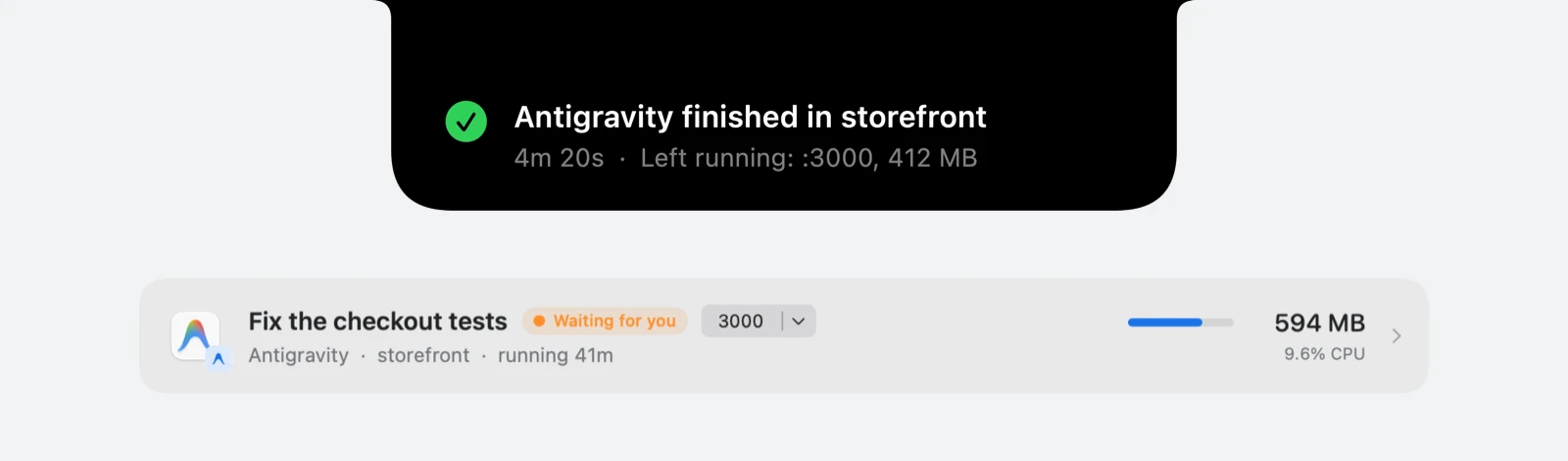
Antigravity is on the Agents tab too, under the title of its latest conversation, with whether it is working or waiting for you.
To set it up, click Connect… beside Antigravity in Vitals’ Settings → Integrations → Coding Agents, then quit and reopen Antigravity.
A customer asked for this one. Antigravity doesn’t let other apps answer its permission requests, so you still answer those in its own window.
Permission requests from Claude Code and Codex
When a coding agent needs permission, it stops and waits until you look at its terminal. Since 1.12, its request comes out of the MacBook notch with the project and the command. Click Allow or Deny there and carry on with your work. You answer Claude Code’s questions the same way.

Each project has its own colour, so with several agents running you know which one is asking. Gemini CLI can only be answered in its own window, so the notch tells you it is waiting.
Alerts come out of the notch too: when the Mac runs out of memory or runs hot, or an app goes over a limit you set. You can quit the app from the alert. Since 1.13 you can also mute an alert, and have alerts stay quiet during a Focus.
AI plan limits
Claude, Codex, Cursor, GitHub Copilot and other AI plans limit you by the session, the week or the month. Vitals shows how much of each limit is left, when it resets, and whether you will run out first. It covers every account signed in on your Mac, and you can keep a plan in the menu bar.

Ports, open files and Homebrew
The Developer tab, added in 1.11, brings these together:
- Dev servers and ports: what is using each port, which project it belongs to, and whether other devices on your network can reach it.
- Open files: which apps are keeping a disk from ejecting. Vitals can quit them and eject it.
- Homebrew: each package with its size and when it last ran, so you can find the ones you don’t use.
- Docker: each container with its memory and CPU.

Fan control
Since 1.10, Vitals can control the fans as well as show their speed. Set a fan to a fixed speed, draw a curve that follows the CPU, GPU or battery temperature, or run the fans at full speed for a few minutes before a render. Above 95 °C they run at full speed whatever the curve says, and when you quit Vitals, macOS takes over again.

The Process Inspector
A process name like com.docker.backend doesn’t tell you much. Click any process to see who signed it, what started it, its command line, its files and ports, and what it has used since it started.
Eight themes
A theme sets the colour of the window, the colours of the charts and the font of the numbers. The eight range from Terminal, green on near-black, to Paper, ink on off-white. Colourblind-friendly chart colours work with any of them.

In Terminal and for AI assistants
The vitals command gives you the same answers in Terminal, as a table or as JSON. The MCP server lets Claude, Codex and Cursor ask what your Mac is doing. Before an assistant quits anything, Vitals asks you.
The main releases
- 1.13.7, 22 November: Antigravity
- 1.13, 17 November: eight themes
- 1.12, 15 November: requests and alerts in the notch
- 1.11, 11 November: the Developer tab
- 1.10, 6 November: fan control
- 1.9, 31 October: the Process Inspector
- 1.8, 21 October: the
vitalscommand, installing with Homebrew, and the free trial - 1.7, 14 October: coding agents and AI plan limits
- 1.6, 11 October: up to a year of history, and CSV export
- 1.4, 8 October: the MCP server
The other updates are smaller, and many fix something a customer reported. All 83 are in the changelog.
What it costs
You pay once, with every future update included. A pack is one licence key for several Macs:
| Licence for life | Price today |
|---|---|
| 1 Mac | $12.99 |
| 2 Macs | $19.99 |
| 5 Macs | $39.99 |
| 10 Macs | $69.99 |
| 25 Macs | $149 |
Buy Vitals at these prices, with no code to enter. Until 5 December, Levers and SoundBar are in the sale too: see all three apps’ prices.
If you already own Vitals, you have nothing to buy. Choose Check for Updates in Vitals to get everything above.
What comes next
Next is storage. Vitals will map what takes up your disk, then help you clear caches and old build files one at a time, saying what each one is first. After that come drive health and the activity of each drive. The roadmap lists it all in order, and a licence for life includes it.
Try it free
Download Vitals, open it and choose Try Free. You get 3 days with every feature, no account and no card. Vitals needs macOS 15 Sequoia or later, on Apple silicon or Intel. With Homebrew, brew install --cask foredotstudio/tap/vitals installs the same app.
Questions
Is Vitals in the Black Friday sale?
Yes, until the end of 5 December 2026, Pacific time. You don't need a code: the sale price is on its page and in the checkout. Every pack is in the sale, for 1, 2, 5, 10 or 25 Macs.
Are Vitals updates free?
Yes. A licence for life includes every update, and everything in this post came in a free update. To get the latest, choose Check for Updates in Vitals.
Does Vitals work with Antigravity?
Yes, with Antigravity's Mac app. In Vitals, connect it in Settings → Integrations → Coding Agents. The notch then tells you when a turn of 30 seconds or more finishes. Antigravity still asks for permission in its own window.
Do I need a MacBook with a notch?
No. On a Mac without a notch, the requests and alerts appear under Vitals in the menu bar.
Does fan control work on a MacBook Air?
No. A MacBook Air has no fans, so Vitals shows its temperatures instead.
Can I try Vitals first?
Yes. It has a free trial of 3 days with every feature, no account and no card, and a 14-day refund if you buy.